Semantic HTML: What It Is, Key Tags & How AI Reads It (2026)
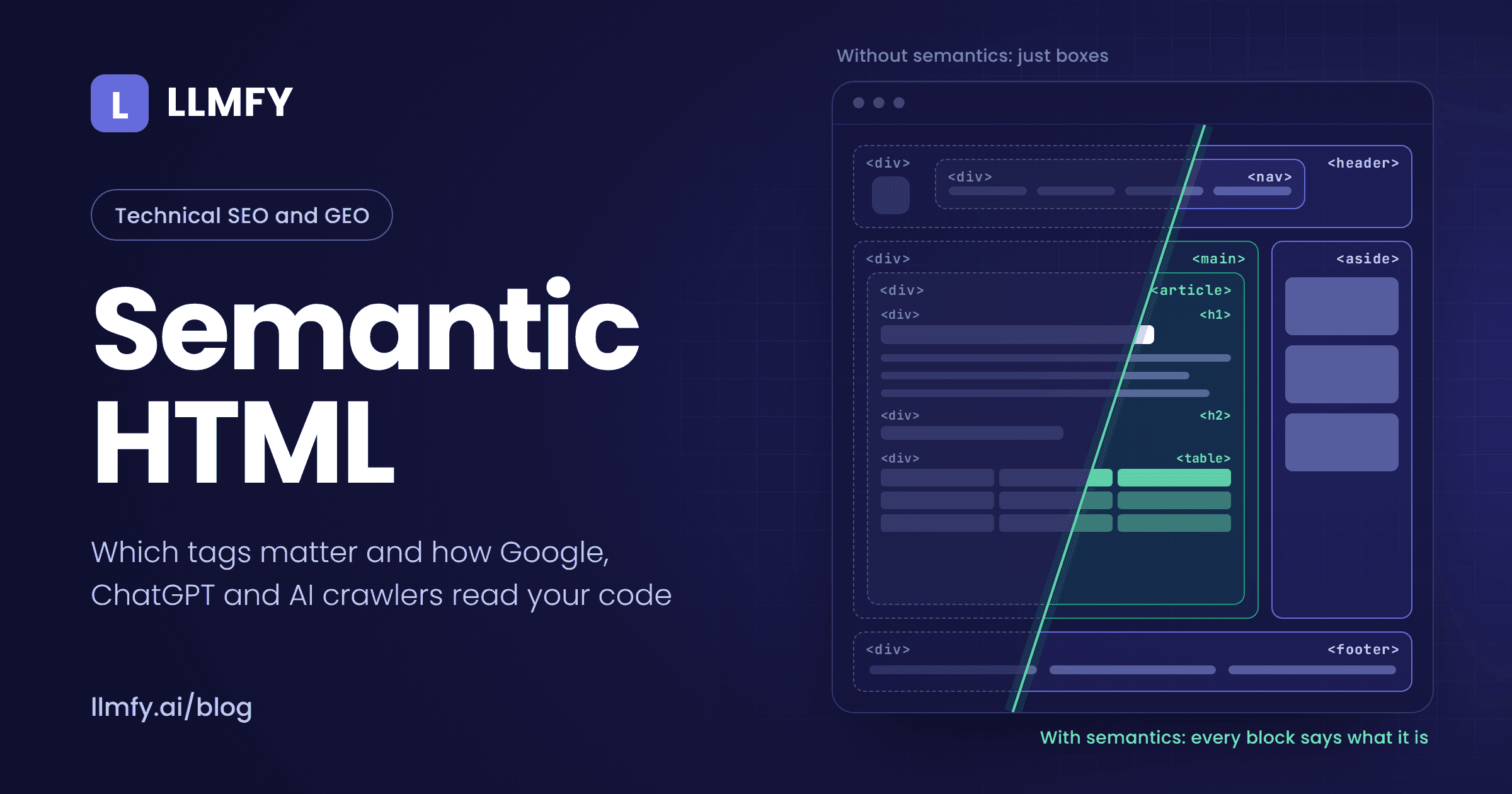
Semantic HTML means building a page with each tag chosen for what it means, not for how it looks: <nav> for navigation, <h2> for a section heading, <button> for a button and <table> for data in rows and columns. The browser doesn't care. Google, screen readers and the AI systems reading your site do.
I've been doing SEO for over 18 years, and for most of that time semantic HTML was "best practice": something developers did if there was time left over. That has changed. The crawlers behind ChatGPT, Claude and Perplexity don't execute JavaScript. The libraries that turn your page into text, whether to train a model or to cite you, decide what is content and what is navigation by looking at your tags. And agentic browsers like ChatGPT Atlas move through your site using the accessibility tree, which is built from your HTML.
For this article I did two things you won't find in the guides ranking today. First, an experiment: the same page marked up three ways and run through the text extractors used by AI datasets. Second, an audit of the HTML of the 15 pages ranking for this keyword on Google US and Google Spain. A preview: the best-known semantic elements tutorial on the web serves six H1s.
What is semantic HTML? Definition and example
A tag is semantic when its name describes its purpose. <div> and <span> say nothing; they're boxes. <article>, <nav> and <time> do say something, and any program reading your code can act on it without guessing.
Compare these two versions of the same block:
<!-- Non-semantic: everything is a box -->
<div class="header">
  <div class="menu">
    <div onclick="location.href='/blog'">Blog</div>
  </div>
</div>
<div class="content">
  <div class="title">Garage Flooring Guide</div>
  <div class="subtitle">Price per square foot</div>
</div>

<!-- Semantic: every tag says what it is -->
<header>
  <nav aria-label="Main">
    <a href="/blog">Blog</a>
  </nav>
</header>
<main>
  <article>
    <h1>Garage Flooring Guide</h1>
    <h2>Price per square foot</h2>
  </article>
</main>
On screen they can look identical. CSS can make a <div> look like a headline and an <h2> look like body text. The difference is what anyone who isn't looking at the screen perceives: in the first version, a crawler finds no link, a screen reader finds no heading and an AI agent has no idea where the menu is.
One nuance most guides skip: semantic doesn't mean "HTML5". <p>, <ul>, <table>, <a> and <h1> have existed since the nineties and are just as semantic as <article>. HTML5 added the structural tags (<header>, <nav>, <main>, <article>, <section>, <aside>, <footer>), and the standard is still evolving: <search> joined the spec in 2023.
Semantic HTML, Schema, semantic SEO and the semantic web are not the same thing
The word "semantic" shows up in four different concepts, and they get mixed up constantly:
| Concept | What it describes | Where it lives |
|---|---|---|
| Semantic HTML | The role of each block on the page: this is a menu, this is an article, this is a table | HTML tags |
| Structured data (Schema) | Entities and their properties: this article was written by this person on this date | Usually JSON-LD |
| Semantic SEO | Meaning and topical coverage in the text | The content |
| Semantic web | Linked data across sites (RDF, OWL), a W3C project from the 2000s | Data formats |
For the second row, see our Schema for LLMs guide. For the third, our guide to semantic SEO. This article is about the first.
Who reads your HTML in 2026 (and none of them read it like you do)
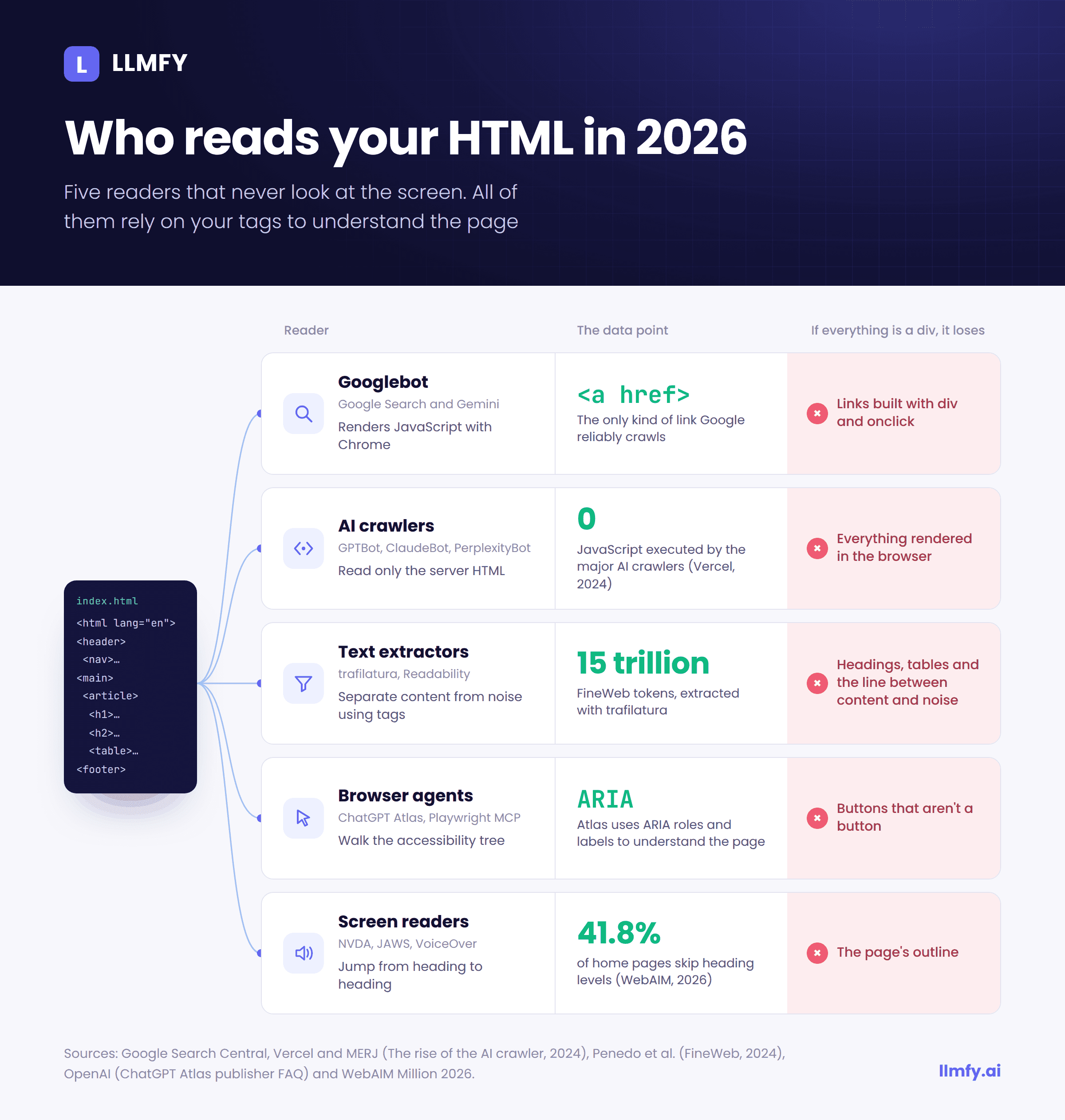
When you think about your page, you think about what it looks like. Most of its readers see nothing at all: they read code. These are the five that matter most today:
| Reader | How it reads your page | What it loses when everything is a div |
|---|---|---|
| Googlebot | Renders JavaScript with Chrome, but only follows a elements with an href | Links it never discovers and a fuzzier idea of the main content |
| AI crawlers (GPTBot, ClaudeBot, PerplexityBot) | Read the HTML your server returns, without executing JavaScript | Everything rendered in the browser |
| Text extractors (trafilatura, Readability) | Separate content from navigation using tags and class names | Headings, tables and the line between content and noise |
| Browser agents (ChatGPT Atlas, Playwright MCP) | The accessibility tree: roles and accessible names | Buttons, links and fields it can't identify |
| Screen readers | The accessibility tree | Navigation by headings and regions |
Googlebot renders, but it doesn't click
Google's documentation is explicit: generally, it can only crawl a link if it's an <a> element with an href attribute. A <div onclick>, or an <a> without href that navigates through JavaScript, isn't reliably extracted. It doesn't matter how well Google renders: rendering isn't clicking.
On every other tag, John Mueller was clear in a 2023 Search Central video: semantic HTML isn't a ranking factor, but it helps Google's systems understand the content better. On another occasion, asked about <article>, he said the element has no particular effect in Google Search and that there are accessibility and semantic reasons to use it that go beyond SEO.
AI crawlers don't execute JavaScript
Vercel and MERJ analyzed crawler traffic across Vercel's network and published the results in December 2024. In one month, GPTBot made 569 million requests and Anthropic's crawler 370 million. None of the major AI crawlers executed JavaScript: they sometimes download .js files, but they don't run them. Only Googlebot (which also feeds Gemini) and AppleBot rendered pages.
In practice: if your content, links or headings only appear after JavaScript runs, they don't exist for ChatGPT or Claude. The HTML your server returns is your only shot, and the clearer it is, the better.
Datasets and answer engines work with extracted text
No model reads your raw HTML. It first goes through an extractor that decides what's content and what's navigation, cookie banners or footer. The best-documented case is FineWeb, Hugging Face's open 15-trillion-token dataset: its authors dropped Common Crawl's default text because it carried too much menu and boilerplate, and extracted text from the original HTML with the trafilatura library instead. Models trained on that cleaner text performed better.
That intermediate step is where your markup becomes an advantage or a problem. Which is why I ran the experiment below.
Agents navigate through the accessibility tree
The accessibility tree is the version of your page the browser builds for assistive technology: a list of roles (button, link, heading, region) with their names. OpenAI's publisher FAQ states that ChatGPT Atlas uses ARIA tags, the same labels and roles screen readers rely on, to interpret page structure and interactive elements. Microsoft's official Playwright MCP server hands models accessibility snapshots instead of screenshots.
If your "Add to cart" button is a <div> with a click handler, an agent shopping on a user's behalf has no clean way of knowing it's a button.
The experiment: one page, three kinds of markup
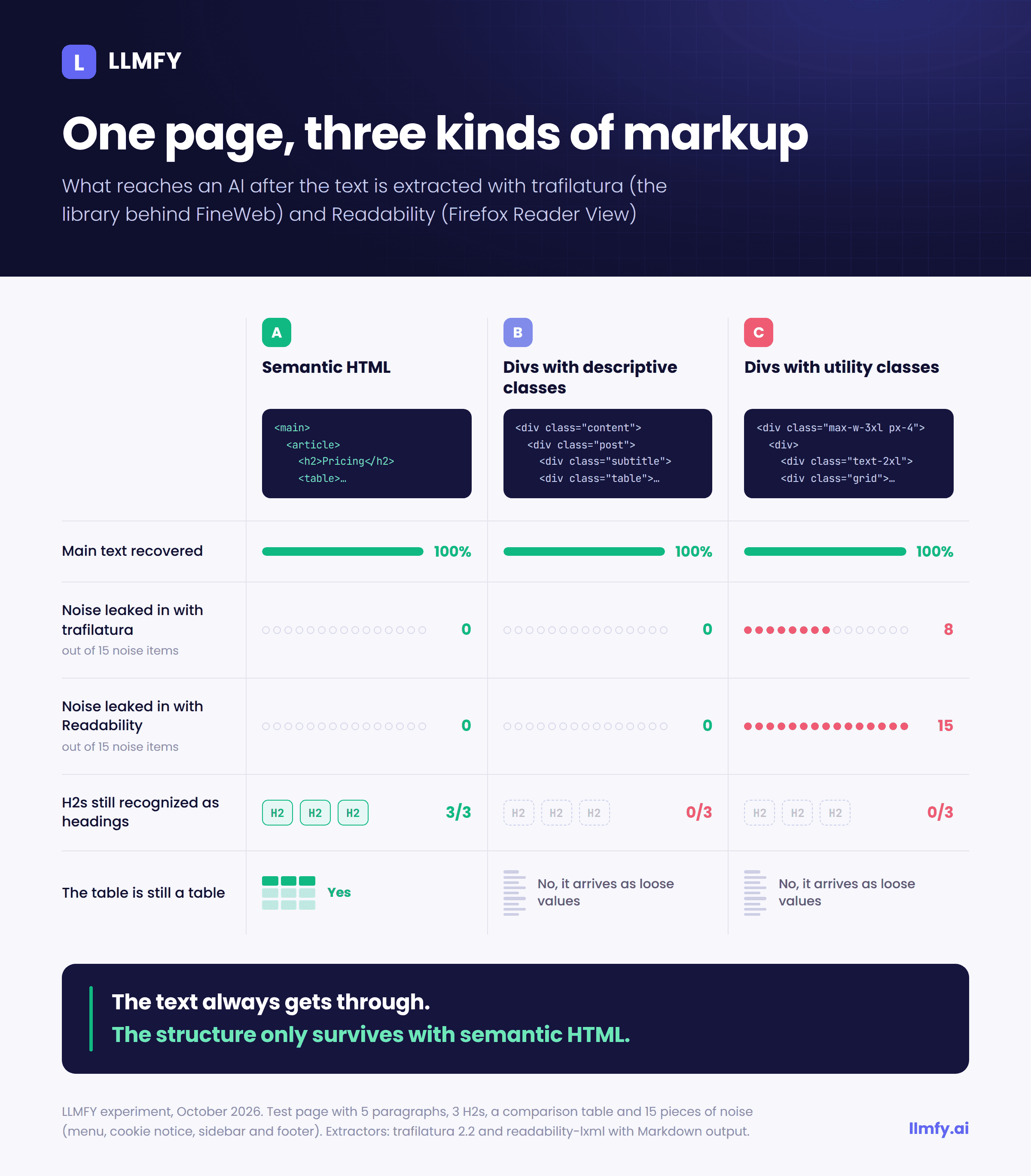
I wanted to test something specific: does markup change what reaches an AI after extraction? So I built a sample page (a short guide to garage flooring) with five paragraphs, three H2s and a comparison table of three materials. Around it I placed 15 pieces of typical noise: a six-link menu, a cookie notice, a sidebar with related posts and a newsletter signup, and a footer with legal links.
I marked it up three ways, all visually equivalent:
- A. Semantic:
<header>,<nav>,<main>,<article>,<h1>/<h2>,<table>with<th>,<aside>and<footer>. - B. Divs with descriptive classes: everything is a
<div>, but with classes likeheader,menu,sidebarorfooter. - C. Divs with utility classes: everything is a
<div>with Tailwind-style classes (flex,px-6,text-2xl…), which is very common on sites built with modern frameworks.
I ran all three through two extractors: trafilatura 2.2 (the library behind FineWeb) with Markdown output, and readability-lxml (the Python port of the algorithm behind Firefox Reader View) converted to Markdown with html2text. The results:
| Version | Extractor | Main text recovered | Noise that leaked in (out of 15) | H2s kept as headings | Table kept as a table |
|---|---|---|---|---|---|
| A. Semantic | trafilatura | 100% | 0 | 3 of 3 | Yes |
| A. Semantic | Readability | 100% | 0 | 3 of 3 | Yes |
| B. Descriptive divs | trafilatura | 100% | 0 | 0 of 3 | No |
| B. Descriptive divs | Readability | 100% | 0 | 0 of 3 | No |
| C. Utility divs | trafilatura | 100% | 8 | 0 of 3 | No |
| C. Utility divs | Readability | 100% | 15 | 0 of 3 | No |
Three takeaways:
1. The text always arrives; the structure doesn't. No extractor lost a single paragraph. The difference is what the text arrives with, and in what shape. Only the semantic version kept all three H2s as headings. In B and C, "Price comparison per square meter" arrived as just another line of text, indistinguishable from a short paragraph.
2. The table falls apart. In the semantic version the table came out as a Markdown table. In B and C it turned into a column of loose values:
Material
Price/m²
Lifespan
Epoxy resin
€35–60
10–15 years
Microcement
€45–80
8–12 years
A model can try to rebuild the relationship between material and price, but it's no longer written down. The semantic version delivered this instead:
| Material | Price/m² | Lifespan |
|---|---|---|
| Epoxy resin | €35–60 | 10–15 years |
| Microcement | €45–80 | 8–12 years |
3. With utility classes, noise gets in. Extractors use class names as hints, which is why version B, with sidebar and footer, came out clean. When classes say nothing (version C), trafilatura let in 8 of the 15 noise items (related posts, newsletter and legal links) and Readability let in all of them. Without semantic tags, you depend on your developer having named their classes well.
Honest limits: this is a short, synthetic page tested with two open-source extractors. OpenAI, Google and Anthropic don't publish their internal pipelines, so this doesn't reproduce what each of them does. It's a directional result, and it points the same way as everything above. (The original page is in Spanish; the table above is translated.)
Audit: the HTML of the pages ranking for "semantic HTML"
On October 1, 2026, I downloaded the HTML of the top 10 results for "semantic html" on Google US and "html semántico" on Google Spain, according to Semrush. I did it without executing JavaScript, which is how an AI crawler sees them. That left 15 valid URLs (two blocked the download). What I found:
- 4 of 15 have no
<main>, so they never declare what the main content is. - 4 of 15 skip heading levels (from H2 straight to H4, for example).
- 7 of 15 have no JSON-LD structured data (including MDN and web.dev, which are technical docs and may not need it).
- The W3Schools tutorial on semantic elements serves six H1s. They're the titles of its menu ("Tutorials", "References"…). It also has four skipped heading levels and around 50
<div>elements for every semantic tag. - An agency page on "semantic HTML and SEO" has three H2s before its H1: the headings of its dropdown menus.
- One page has 42 of its 185 images without an
altattribute.
I'm not sharing this to call anyone out. Look at the pattern: almost every problem is in the template (menus, sidebars, footers), not in the article. Whoever writes the content usually gets it right. The WordPress theme, page builder or menu component breaks it afterwards.
The WebAIM Million 2026, which analyzes the home pages of a million websites every year, says the same thing at scale: only 46.1% of home pages have a <main>, 18.1% have more than one H1 and 41.8% skip heading levels.
The semantic tags that matter, by family
Page structure
| Tag | What it's for | Typical mistake |
|---|---|---|
header | Header of the page or of a block (an article can have its own) | Using it for any visual strip at the top |
nav | Major navigation blocks: main menu, breadcrumbs, table of contents | Wrapping every list of footer links in a nav |
main | The main content. One visible per page | Not having one, or having two |
article | A self-contained piece that makes sense on its own: a post, a product card, a comment | Wrapping the entire page, menu included |
section | A thematic section, with its own heading | Using it as a div with a different name |
aside | Related but non-essential content: sidebar, side note | Putting main content in it |
footer | Footer of the page or of a block: authorship, legal, secondary links | Putting the main contact form in it |
search | The site's search area (added in 2023) | Still using a div with role="search" |
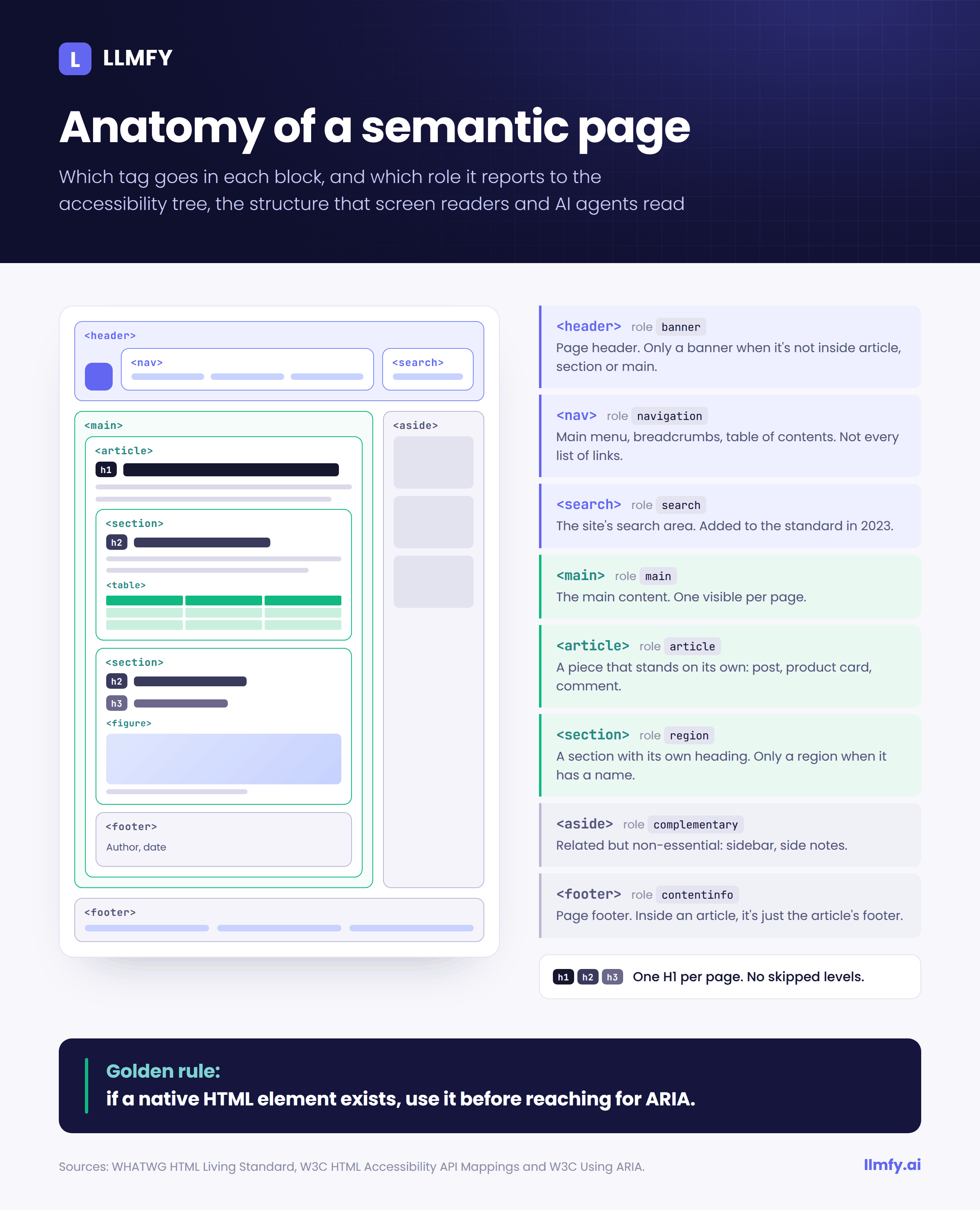
Two details that change the accessibility tree: <header> and <footer> only count as the page's banner and content info when they're not inside an <article>, <section> or <main>. And a <section> is only exposed as a region if it has a name, usually through aria-labelledby pointing to its heading.
This is the structure I use as a starting point for a blog post:
<body>
  <header>
    <a href="/">Brand</a>
    <nav aria-label="Main">…</nav>
    <search><form role="search">…</form></search>
  </header>
  <main>
    <article>
      <header>
        <h1>Post title</h1>
        <p>By <a href="/author/ana">Ana Pérez</a> ·
          <time datetime="2026-10-01">October 1, 2026</time></p>
      </header>
      <section aria-labelledby="pricing">
        <h2 id="pricing">Pricing</h2>
        …
      </section>
      <footer>About the author…</footer>
    </article>
  </main>
  <aside aria-label="Related posts">…</aside>
  <footer>Legal · Cookies</footer>
</body>
Headings: the table of contents everyone reads
Headings are the first thing screen reader users rely on to move around a page, and the first thing many AI systems use to split it up. Three rules:
- One H1 that describes the page, H2s for sections and H3s for what sits under them, with no skipped levels.
- No headings for styling. If a menu block title or a newsletter "Subscribe" is an H2, you're adding noise to the page's outline. That's exactly the W3Schools problem from the audit.
- Forget the HTML5 "outline". The idea that every
<section>resets the hierarchy and gets its own H1 was never implemented by any browser, and WHATWG removed it from the spec in 2022. An H1 inside a<section>is still an H1.
What about multiple H1s? Google has said they don't hurt rankings. I still recommend one: it's what screen reader users expect, and it makes it easier for an extractor or an agent to work out what the page is about.
Text with meaning
This is where the subtler mistakes live, the ones that separate people who've read the spec from people who haven't:
<strong>marks importance and<em>marks emphasis.<b>and<i>only change the look.<blockquote>is a long quotation, withcitepointing to the source. And<cite>is the title of a work, not a person's name:<cite>Moby-Dick</cite>, not<cite>Melville</cite>.<time datetime="2026-10-01">turns a human-readable date into a machine-readable one. It should match thedatePublishedin your Schema.<address>is contact information for the author or owner of the page, not any postal address that happens to appear in the text.<abbr title="Generative Engine Optimization">GEO</abbr>expands acronyms.<dfn>marks the term being defined, which is handy in definition paragraphs.<code>,<pre>and<kbd>for code, preformatted blocks and keys.
Lists and tables
<ul> for unordered lists, <ol> for steps and rankings, and <dl> (description list) for term-definition pairs: glossaries, spec sheets, product specifications. That last one is underused, and it's one of the easiest structures to extract there is.
Tables are for tabular data and nothing else. With <caption>, <thead> and <th scope="col">. According to the WebAIM Million 2026, only 19% of the tables found had valid data table markup. And you've already seen in the experiment what happens to a table built from divs when a machine reads it.
<table>
  <caption>Approximate installed price</caption>
  <thead>
    <tr><th scope="col">Material</th><th scope="col">Price/m²</th></tr>
  </thead>
  <tbody>
    <tr><td>Epoxy resin</td><td>€35–60</td></tr>
  </tbody>
</table>
Images and media
alt describes what the image does, not a literal description of how it looks. If it's decorative, use an empty alt="" (empty, not missing). For images with captions, <figure> and <figcaption> tie the text to the image unambiguously. In the WebAIM Million 2026, 16.2% of images had no alternative text and another 10.8% had alt text that was useless ("image", "photo", a file name).
Interaction: links, buttons and forms
The rule is simple: <a href> to go somewhere, <button> to do something on the page. Anything else (<div> or <span> with click handlers) is invisible to Googlebot as a link and ambiguous to an agent as a control.
<!-- Bad: neither a crawlable link nor an accessible button -->
<div class="btn" onclick="addToCart(42)">Add to cart</div>

<!-- Good: the browser knows it's a button,
     it's keyboard-focusable and it shows up in the accessibility tree -->
<button type="button" onclick="addToCart(42)">Add to cart</button>
In forms, every field needs its <label>: a third of the form fields on the home pages WebAIM analyzed didn't have one. And for FAQ accordions, <details> and <summary> work without JavaScript, with the text in the HTML from the start.
Semantic HTML and SEO: what Google says and what it doesn't
Let's be precise, because there's a lot of mythology here:
- It's not a direct ranking factor. Google has said so several times. Swapping your
<div>elements for<section>won't move your rankings. - It does affect things that affect rankings. Google only follows
<a href>links, uses headings to understand what each section is about, pulls lists and tables into featured snippets and usesaltfor Google Images. - Two H1s won't get you penalized. Whether it's a good idea is another question.
- Schema doesn't replace semantic HTML. They're different layers: HTML describes the page and Schema describes the entities. Ideally they tell the same story, for example with the same date in
<time>and indatePublished.
Semantic HTML and GEO: why it matters more in AI search
If semantic HTML was hygiene for classic SEO, for GEO it's infrastructure. Five reasons:
1. If it's not in the server HTML, it doesn't exist for AI
With AI crawlers not executing JavaScript, server-side rendering (SSR) or static generation stops being a technical preference. If your site is an SPA that renders content in the browser, the perfect semantic HTML you see in Chrome's inspector never reaches GPTBot.
2. Headings are the seams your content gets cut along
Answer engines don't cite whole pages: they cite passages. Many RAG pipelines split text by headings (libraries like LangChain ship a Markdown header splitter). If your H2s don't survive extraction, as in versions B and C of the experiment, your article gets chopped blindly. And if they do survive, every section needs to stand on its own: lead with the answer in the first sentence, with no "as we saw earlier".
3. Tables and lists arrive intact; divs arrive in pieces
A well-marked-up comparison is one of the most citable things you can publish, because the model receives the relationships between data points ready-made. A comparison built from divs reaches it as a column of loose values.
4. Agents need to know what a button is (and ARIA isn't the first answer)
OpenAI recommends following WAI-ARIA best practices so Atlas understands your controls. Be careful not to read that as "add ARIA to everything". The first rule in the W3C's guidance on using ARIA says that if a native HTML element already has the semantics and behavior you need, you should use that element. Accessibility specialists like Adrian Roselli criticized OpenAI's message for exactly this reason: it pushes people to layer ARIA on top of bad HTML.
The data backs them up: in the WebAIM Million 2026, pages using ARIA averaged 59.1 detected accessibility errors, compared with 42 on pages without it. My rule of thumb: native HTML for 90% of cases, and ARIA only for components with no native equivalent, like tabs or comboboxes, following the W3C patterns to the letter.
5. Semantics and Schema: two layers that reinforce each other
HTML says "this block is the main article and this is its date". Schema says "this Article was written by this Person, with these credentials, and is about this entity". When both layers agree, whatever is reading your page has less to guess. It's the same logic we cover in E-E-A-T for LLMs: consistent signals.
Accessibility: it's also a legal requirement
In the EU, the obligations of the European Accessibility Act have applied since June 28, 2025, covering among other things e-commerce services aimed at consumers, with an exemption for service microenterprises. In the US, website accessibility is a steady source of ADA litigation. I'm not a lawyer and every case has its nuances, but the practical message is clear: for a lot of online stores, web accessibility is no longer optional.
And the starting point isn't great. In the WebAIM Million 2026, 95.9% of home pages had detectable WCAG failures, with an average of 56.1 errors per page. By e-commerce platform, PrestaShop home pages averaged 143.2 errors, Magento 75.8 and Shopify 75.1.
Semantic HTML doesn't fix everything (color contrast, for instance, is a design problem), but it goes straight at four of the six most common errors in the report: missing image alternatives, unlabeled fields, empty links and empty buttons. Declare the language with <html lang="en"> as well, and that's five out of six.
How to audit your semantic HTML in 15 minutes
- Check what your server returns. Open the page source (Ctrl+U, not the inspector) and search for a sentence from your article. If it's not there, AI crawlers can't see it.
- Try Firefox Reader View. It uses the same algorithm (Readability) as many extraction tools. If it doesn't show your article cleanly, with its sections, you have a markup problem.
- Check headings, links and buttons with the script below.
- Open the accessibility tree in Chrome DevTools (Elements tab, Accessibility pane). That's how an agent sees you.
- Run Lighthouse and WAVE for what can be automated:
alt,label,lang, contrast. - Audit the template, not just the post. Menu, sidebar and footer. That's where almost every problem in the audit was.
Paste this into your browser console (F12) with your page open:
// Quick semantic HTML check
const hs = [...document.querySelectorAll('h1,h2,h3,h4,h5,h6')];
console.table(hs.map(h => ({ level: h.tagName, text: h.textContent.trim().slice(0, 70) })));
let prev = 0;
hs.forEach(h => {
  const n = +h.tagName[1];
  if (prev && n > prev + 1) console.warn('Skipped level:', h.tagName, h.textContent.trim());
  prev = n;
});
const badLinks = [...document.querySelectorAll('a')].filter(a => {
  const href = a.getAttribute('href');
  return !href || href === '#' || href.startsWith('javascript:');
});
console.log('H1:', document.querySelectorAll('h1').length,
  '| main:', document.querySelectorAll('main').length,
  '| links without a valid href:', badLinks.length,
  '| div/span with onclick:', document.querySelectorAll('div[onclick],span[onclick]').length,
  '| images without alt:', document.querySelectorAll('img:not([alt])').length,
  '| lang:', document.documentElement.lang || 'NOT DECLARED');
A warning: the onclick counter only catches handlers written into the HTML. Frameworks usually attach click handlers from JavaScript, so a zero there proves nothing. That's what step 4 is for.
The mistakes I see most often
<div>or<span>elements acting as links or buttons.- Headings chosen for font size, especially in menus, widgets and footers.
- Pages with no
<main>, or with several. <section>everywhere, with no heading, as a stand-in for<div>.- Tables built from divs and, the other way round, layouts built from tables.
- Redundant ARIA on native elements, like
<button role="button">. - Content that only appears after JavaScript runs.
<cite>for people's names andalt="image"on every photo.
Frequently Asked Questions About Semantic HTML
What is semantic HTML?
Semantic HTML is the practice of using each tag for its meaning (nav for navigation, h2 for a section heading, button for a button, table for data) instead of generic boxes like div. That way browsers, search engines, screen readers and AI systems understand the role of every part of the page without having to guess.
What are the main semantic HTML5 elements?
The structural ones are header, nav, main, article, section, aside and footer, plus search, added in 2023. On top of those are long-standing semantic tags: h1 to h6, p, ul, ol, dl, table, figure, time, strong, em, blockquote, a and button.
Does semantic HTML improve rankings on Google?
It isn't a direct ranking factor, and Google has said so several times. It does help indirectly: Google only follows a elements with an href, uses headings to understand sections, pulls lists and tables into featured snippets and reads the alt text of images.
What is the difference between section and article?
An article is a piece that makes sense on its own outside the page: a blog post, a product card, a comment. A section is a thematic part of something larger and should have its own heading. If in doubt, ask whether the block could be published as-is on another site.
What is the difference between div and section?
A div means nothing: it's a container for grouping or styling. A section marks a thematic part with a heading. If you just need a box for CSS, use a div. Turning every div into a section doesn't add semantics, it adds noise.
Can a page have more than one H1?
Technically yes, and Google has said it doesn't penalize it. A single H1 that describes the page is still the better choice: it's what screen reader users expect, and it makes it easier for extractors and AI agents to identify the main topic.
Does semantic HTML affect ChatGPT and other AI tools?
Yes, although none of them publishes its full pipeline. The AI crawlers analyzed by Vercel did not execute JavaScript, text extractors use tags to separate content from navigation, and ChatGPT Atlas navigates through the accessibility tree. In our experiment, only the semantic version kept its headings and table after extraction.
Is semantic HTML the same as Schema?
No. Semantic HTML describes the role of each block on the page. Schema structured data, usually in JSON-LD, describes entities and their properties, such as the author, the date or the price. They complement each other and should tell the same story.
Conclusion
Semantic HTML won't move your rankings on its own, and anyone who says otherwise is selling something. What it does decide is how your content reaches everything that isn't a human looking at a screen: the crawler that doesn't run JavaScript, the extractor deciding what's navigation, the system splitting your article by headings and the agent that has to find your checkout button.
In 2026, those readers are already the majority. And as the audit showed, not even the pages teaching semantic HTML apply it in their own templates. That's an easy advantage to take.
At LLMFY we analyze the signals AI systems use to decide who to cite: Schema Scan reviews your structured data and Robots.txt Optimizer shows which AI crawlers can get into your site. Analyze your URL for free and see where it's falling short.
Sources and References
- WHATWG — HTML Living Standard — The official HTML specification.
- MDN Web Docs — Semantics — Definition and examples.
- Google Search Central — Link best practices for Google — Which links Google can crawl.
- Search Engine Journal — Semantic HTML: Not A Ranking Factor But Still Important — John Mueller's statements (2023).
- Search Engine Journal — Google Answers Question About The Impact Of ARTICLE Semantic HTML Element — Mueller on the article element.
- Vercel and MERJ — The rise of the AI crawler — How AI crawlers handle JavaScript (December 2024).
- Penedo et al., Hugging Face — The FineWeb Datasets — Text extraction with trafilatura for LLM training.
- WebAIM — The WebAIM Million 2026 — Accessibility of the top one million home pages.
- W3C — Using ARIA — The rules of ARIA use.
- Search Engine Journal — How AI Agents See Your Website — How Atlas, Playwright MCP and other agents read the web.
- Adrian Roselli — OpenAI, ARIA, and SEO: Making the Web Worse — A critique of OpenAI's ARIA recommendation.
- EUR-Lex — Directive (EU) 2019/882 — The European Accessibility Act.
- LLMFY — Schema for LLMs, Semantic SEO and Information gain — Related guides.